写的一个vue小项目,接口基于cnode社区开放接口,项目使用Vue2.0实现,写了一段时间了总结一下项目,该项目未适配手机屏幕。
源码地址 | 预览地址
项目主体结构
因为项目较小,就没有使用vuex,网络方面使用axios。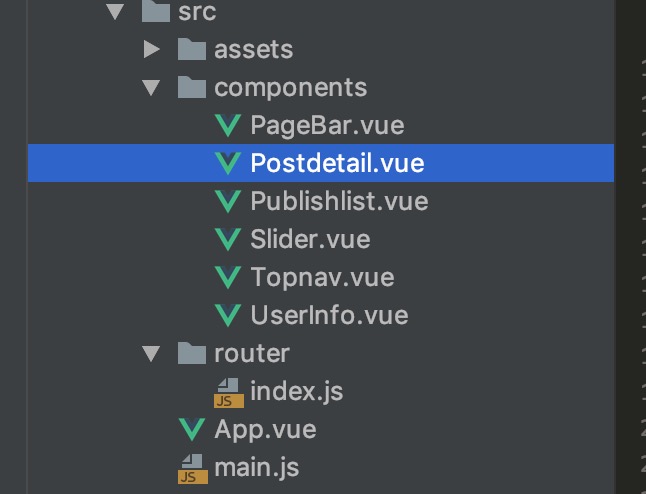
axios挂载
一般当我们网络请求时,都需要一个网络框架,这里我选择axios。每当一个组件需要网络请求时,都需要引入axios模块,为了避免这种重复操作,可以把axios挂载到Vue的原型上
入口文件main.js
1
2
3
4
5
import Axios from 'axios'
import Vue from 'vue'
/*这里可以随便命名,为了方便记住,我命名$http*/
Vue.prototype.$http = Axios
需要使用的组件调用1
2
3
4
5
6
7
8
9this.$http.get('...',{
params: {
...params
}
}).then((res) => {
// ... do something
}).catch(error =>{
// ... do something
})
路由配置
总共5个组件模块,顶部导航栏、主页列表、详情即评论区域、个人详情、分页器
详情页的数据信息因为返回的html数据形式,这里引入了一个第三方mardown文本样式
1
@import url('../assets/markdown.css');//引入markdown样式
vue-router路由配置信息1
2
3
4
5
6
7
8
9
10
11
12
13
14
15
16
17
18
19
20
21
22
23
24
25
26
27
28
29Router({
// 如果需要去掉路径上的#,model使用history模式
// mode:'history',
routes: [
{
name:'root',//router-link跳转时需要使用
path:'/',
components:{
main: Publish//这里和下面命名main是因为渲染的时候(router-view 时需要用)
}
},
{
name:'post-detail',
path:'/topic/:id&:name',//需要传递参数id和name,注意在
components:{
main: Postdetail,
slider: Slider
}
},
{
name:'user-page',
path:'/user/:username',
components:{
main:Userinfo
}
},
]
})
分页器的实现
在主页的底部,我们需要一个分页器。首先我们要理清需求,做一个最多显示5页的分页器,当大于5页的时候,前面显示省略号,页数也都加1,当页数小于5时,前面的省略号消失。
大体效果如下

首先我们构建一个分页容器,其中ismore用于判断是否显示前边的省略号,selectIndex用于判断当前选中页数
1
2
3
4
5
6
7<div class="page-wrapper">
<button @click="changeBtn">首页</button>
<button @click="changeBtn">上一页</button>
<button v-show="ismore">......</button>
<button @click="changeBtn(item)" v-for="item in Pages" :class="{active: selectIndex === item}">{{item}}</button>
<button @click="changeBtn">下一页</button>
</div>
初始数据值1
2
3
4
5
6
7data:function() {
return{
Pages:[1,2,3,4,5,'......'],//初始页数
selectIndex:1,//初始选中状态
ismore:false//是否显示前面的......
}
}
按钮点击逻辑处理1
2
3
4
5
6
7
8
9
10
11
12
13
14
15
16
17
18
19
20
21
22
23
24
25
26
27
28
29
30
31
32
33
34
35
36
37
38changeBtn(page){
//过滤点击省略号事件
if (typeof page !== 'number') {
if (typeof page === 'string'){
return
}
let str = page.currentTarget.innerText
switch (str) {
case '首页':
this.Pages = [1,2,3,4,5,'......'];
this.changeBtn(1);
break
case '上一页':
this.$jq('button.active').prev().click()
break
case '下一页':
this.$jq('button.active').next().click()
break
}
return
}
this.selectIndex = page;
if(page>4){//判断是否显示省略号
this.ismore = true;
}else{
this.ismore = false;
}
//页码状态处理
if(page == this.Pages[4] ){
this.Pages.shift();
this.Pages.splice(4,0,this.Pages[3]+1);
}else if(page == this.Pages[0] && page !=1){
this.Pages.unshift(this.Pages[0]-1);
this.Pages.splice(5,1);
}
//通知主页按钮已经点击,实时更新数据
this.$emit('changePage',page)
}
总结
总的说来,这是一个非常适合练手的项目,逻辑简单明了,页面逻辑也不是很复杂,可能其中还有些没讲到,不过可以下载源码在细致看一下,上面这些是我大致认为该项目还比较重要的内容,以此做个记录